
Pending vs Posted Transactions: What to Count in Your Budget and Monthly Spending Review
Pending charges can distort your totals, especially around restaurant tips, gas-station holds, hotel authorizations, returns, and disputes. Here is a practical workflow for separating reserved money from final spend so you can review a month accurately.
If you review spending from your banking app instead of waiting for a monthly statement, you will usually see a mix of pending and posted activity. That is useful for day-to-day cash awareness, but it can also create messy monthly totals. A restaurant tip may change after authorization. A gas station may place a temporary hold. A hotel or rental-car merchant may authorize more than the final bill. A return may show up later as a credit.
The practical fix is to track pending activity and final spending separately. Official consumer guidance and issuer documentation support the same basic idea: pending transactions are not final, posted transactions are. If you want a cleaner budget and a more accurate monthly review, build your workflow around that distinction.
What pending and posted transactions actually mean
A pending transaction is an approved transaction that is still being processed. Capital One explains that pending items can include purchases, returns, deposits, transfers, and card payments, and that they can affect your available balance or available credit before they are fully processed. Once the bank or card issuer finishes processing the item, it becomes posted, cleared, or settled.
That difference matters because a pending amount can still change or disappear. Chase notes that restaurants, gas stations, hotels, and rental car companies are common examples where the pending amount may not match the final posted amount. Capital One also notes that some pending debit transactions never post at all, such as canceled or voided transactions.
What to count, and where
The cleanest household workflow is to keep three views instead of one:
- Available-money view: include pending debits, because they can reduce available cash or available credit right now.
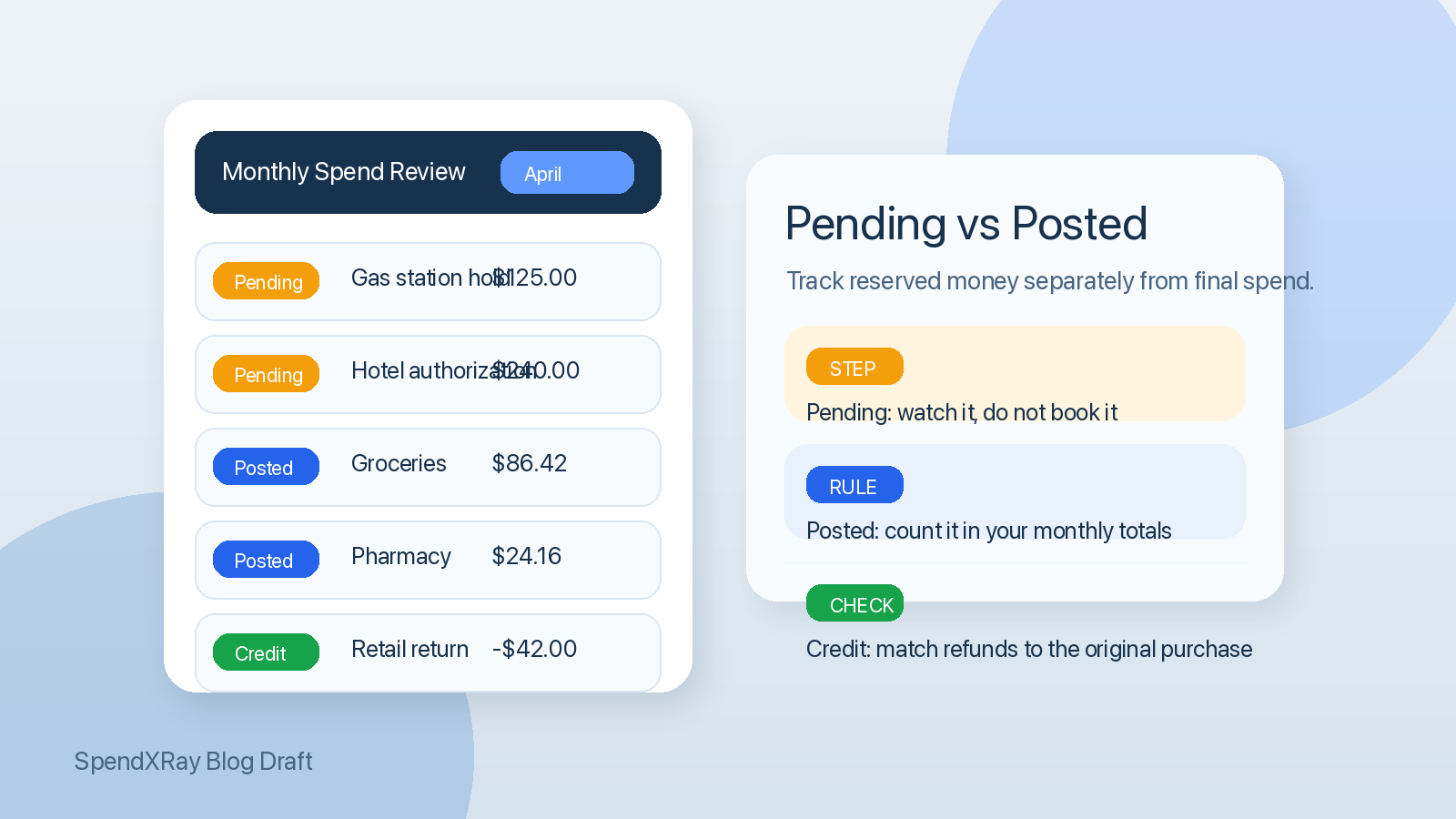
- Monthly spending view: count posted purchases and posted credits only, because those are the final items that belong in your period totals.
- Follow-up view: keep a short list of pending items that need a check later, especially holds, returns, and transactions that still look wrong after posting.
This is a practical recommendation rather than a legal rule, but it lines up with how issuers describe transaction status and how statements work. If you mix all three views together, you are much more likely to double-count spending, miss refunds, or panic over temporary authorizations that were never going to become final charges.
A simple monthly review workflow
- Close the month on posted activity. Use posted transactions and posted credits as the base for your monthly category totals.
- Keep pending items out of final category totals. Track them in a separate queue until they post, change, or disappear.
- Match credits to the original purchase when possible. If you return an item in April for something you bought in March, note the credit separately so your records still explain both the original spend and the later refund.
- Review temporary-hold merchants separately. Restaurants, hotels, gas stations, and rental-car merchants deserve a second look because their pending amounts often differ from the final bill.
- Escalate only after the item is final or clearly overdue. If a pending item posts incorrectly, contact the merchant first, then move to the issuer dispute process when appropriate.
How to handle common cases
| Situation | What to do in your cash-flow view | What to do in your monthly spending review | When to follow up |
|---|---|---|---|
| Restaurant charge before tip settles | Treat the pending amount as reserved money | Wait for the posted total before finalizing dining spend | If the posted amount is wrong, contact the merchant or issuer |
| Gas-station authorization hold | Assume the hold temporarily reduces available funds | Count only the posted purchase amount | Check again after the hold should have cleared |
| Hotel or rental-car incidental hold | Keep the authorization visible in your open-items list | Use the final folio or posted charge for travel totals | Follow up if the authorization does not reverse after settlement |
| Retail return still pending | Do not spend against the expected refund yet | Book the credit when it posts, not when the return is initiated | Contact the seller if the credit does not arrive as promised |
| Charge looks unfamiliar but is still pending | Flag it and monitor it | Do not add it to category totals yet | If it posts and still looks wrong, use the dispute process |
What to do if the final charge is wrong
If a transaction posts incorrectly, start with the merchant. The CFPB says that for products or services bought with a credit card, the first step is usually to ask the seller to refund the money or undo the charge. If that does not resolve the problem, you may be able to dispute the charge with your credit card company.
For credit card billing errors, timing matters. The CFPB says you should send a written billing error notice within 60 days after the statement that first showed the problem was sent to you. The CFPB also explains that once you give proper notice, you do not have to pay the disputed amount while the issuer investigates, although you still must pay any undisputed charges on time.
If a return or correction creates a credit balance on your credit card, CFPB guidance and Regulation Z both note that the issuer owes that balance to you. In practice, many people simply leave the credit to offset future purchases, but you can also request a refund.
How this helps a spending tracker work better
A good spending system should not force pending authorizations, posted purchases, and credits into the same bucket. If you import retailer orders or card-linked spending into a tool like SpendXRay, the useful habit is to add context at the item level while keeping transaction status straight. That makes it easier to answer three different questions later: what money is tied up right now, what you actually spent this month, and which items still need follow-up.
That separation is especially useful when you are reviewing a dense month with returns, travel holds, subscription renewals, or medical purchases that may need documentation later. Cleaner status handling means cleaner categories, less false overspending, and fewer mysteries at statement time.
What to do next
- Base your monthly category totals on posted transactions and posted credits, not raw account activity.
- Keep a short pending-items list for restaurant tips, gas holds, hotel authorizations, returns, and any unfamiliar charge.
- Recheck open items after a few business days and compare them with the final posted amount.
- Save merchant emails, order pages, and receipts for any transaction that may need a refund, reimbursement, or dispute later.
- If a posted credit-card charge is wrong, act quickly so you do not miss the CFPB's 60-day billing-error window.
Conclusion
Pending transactions are useful for real-time awareness, but they are not reliable as final spending records. If you separate reserved money from settled money, your budget gets cleaner, your monthly reviews make more sense, and your follow-up list gets much shorter. The goal is simple: treat pending activity as something to watch, and treat posted activity as what you actually count.
Sources
- Capital One: Pending transactions: What are they and how do they work?
- Capital One Help Center: Pending debit card transactions for bank accounts
- Chase: What are pending transactions and how long do they take?
- CFPB: How to fix mistakes in your credit card bill
- CFPB: How do I dispute a charge on my credit card bill?
- CFPB: How can I get a refund on a product or service I purchased with my credit card?
- CFPB: What is a credit balance on my credit card bill?
- CFPB Regulation Z, 12 CFR § 1026.11
- CFPB Regulation Z, 12 CFR § 1026.13